az-scout: Scout Azure regions for VM availability, zone mappings, deployment planning and more
Overview
When planning resilient VM deployments across Azure regions and Availability Zones, operators often face a set of recurring questions that are surprisingly hard to answer quickly:
- Do my subscriptions share the same physical datacenter for logical zone 1?
- Which VM SKUs are available in all three zones with enough quota headroom?
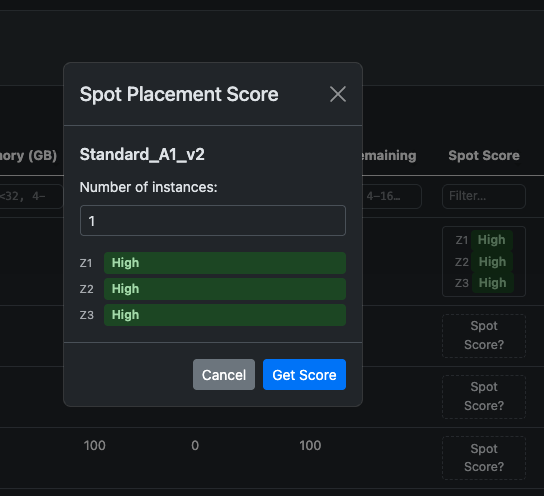
- What is the Spot placement likelihood for this SKU family right now?
- Which deployment plan gives me the best confidence score across zones?
- How can I guarantee capacity for my VM allocation in this region?
These questions require correlating data from multiple Azure ARM endpoints — zone mappings, SKU catalogs, quota usage, spot placement scores, and retail pricing — then cross-referencing it across subscriptions. Doing this manually in the portal or with CLI scripts can be tedious and error-prone.
To address this, Remy Sabile and I co-authored az-scout: a multi-purpose tool that brings all of this data together in one web UI, with an integrated AI assistant and an MCP server for AI agent integration.
And the best part? It's fully extensible through a plugin system, allowing anyone to add new capabilities!
What az-scout does
az-scout is a Python web application built with FastAPI. Once authenticated with Azure credentials (az login or any method supported by DefaultAzureCredential), it provides:
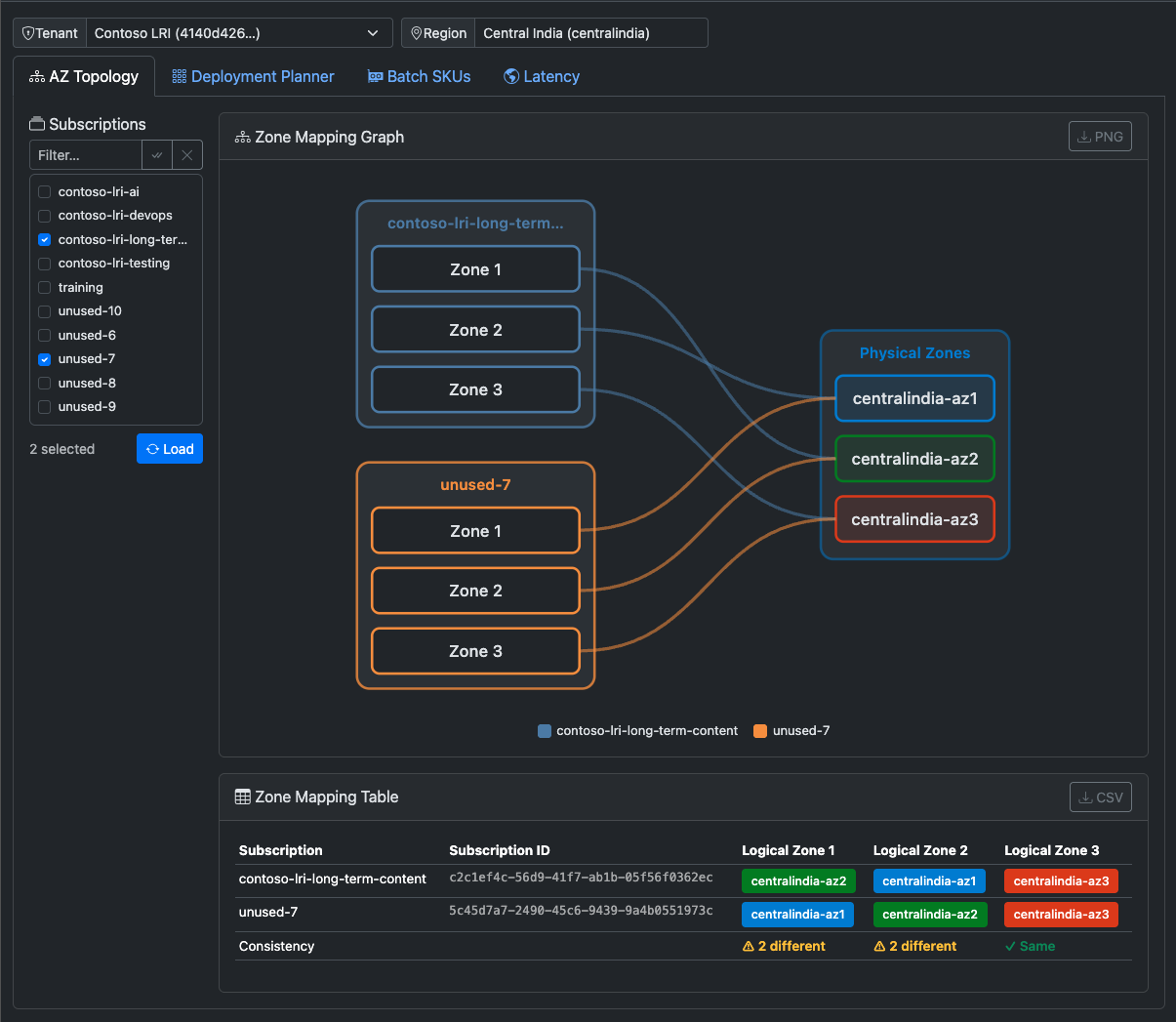
- AZ Topology — visualize logical-to-physical zone mappings across all your subscriptions for a given region, rendered as a D3.js graph to instantly spot whether two subscriptions share the same physical zone for a given logical number.
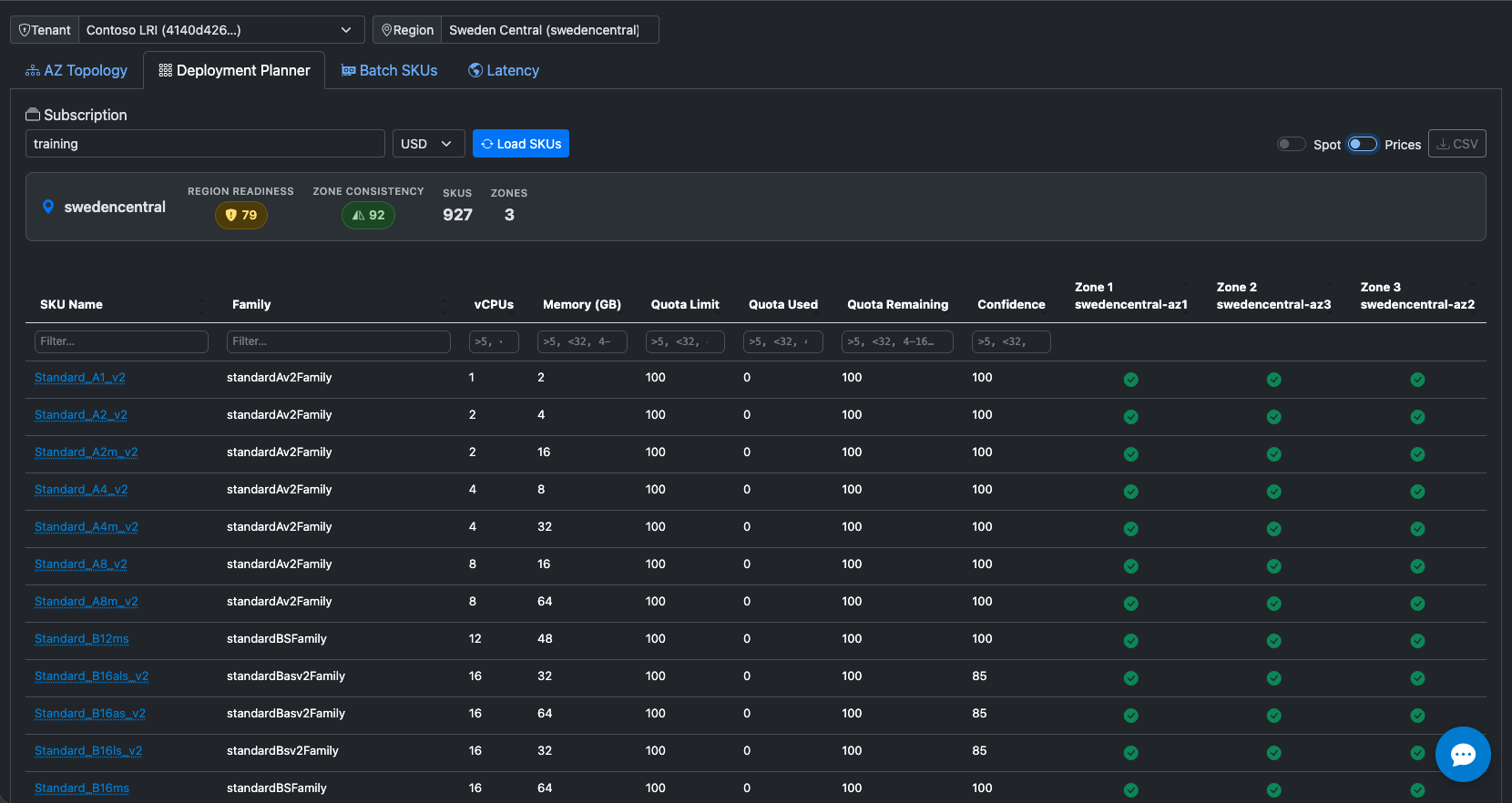
- Deployment Planner — list VM SKUs with zone availability, restrictions, quota headroom, Spot placement scores, and pricing. Each SKU gets a Deployment Confidence Score (0–100) synthesized from multiple signals.
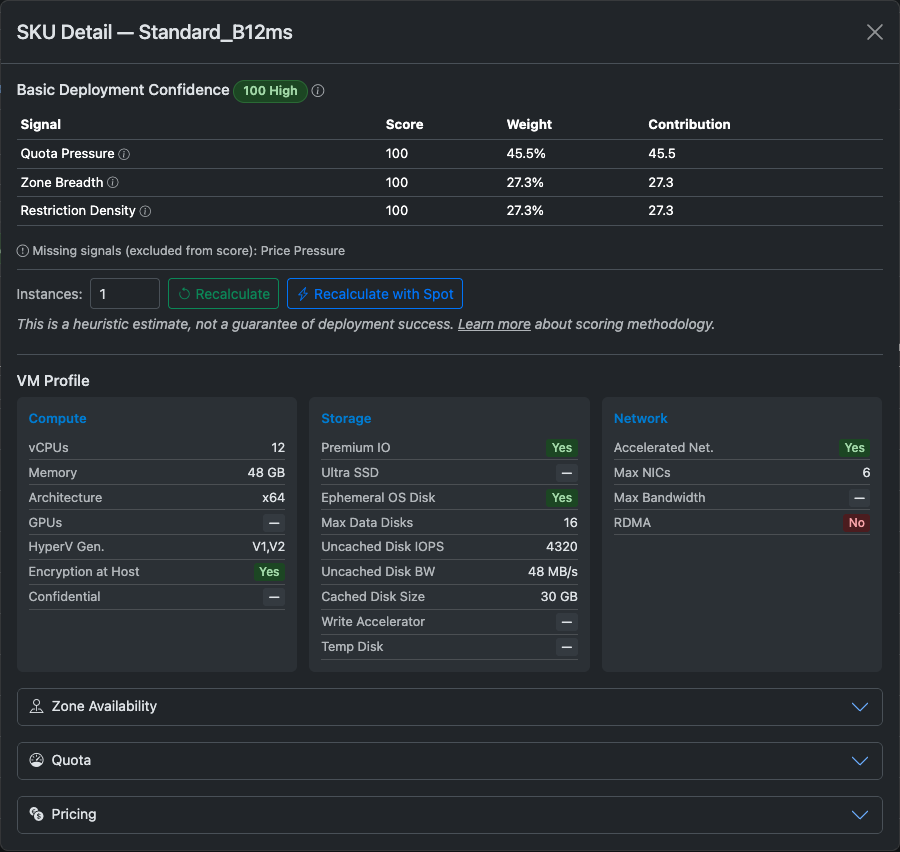
Click on any SKU to drill into detailed pricing (PayGo, Spot, Reserved Instances, Savings Plans) and VM profile:
| Pricing detail | Spot placement scores |
|---|---|
 |  |
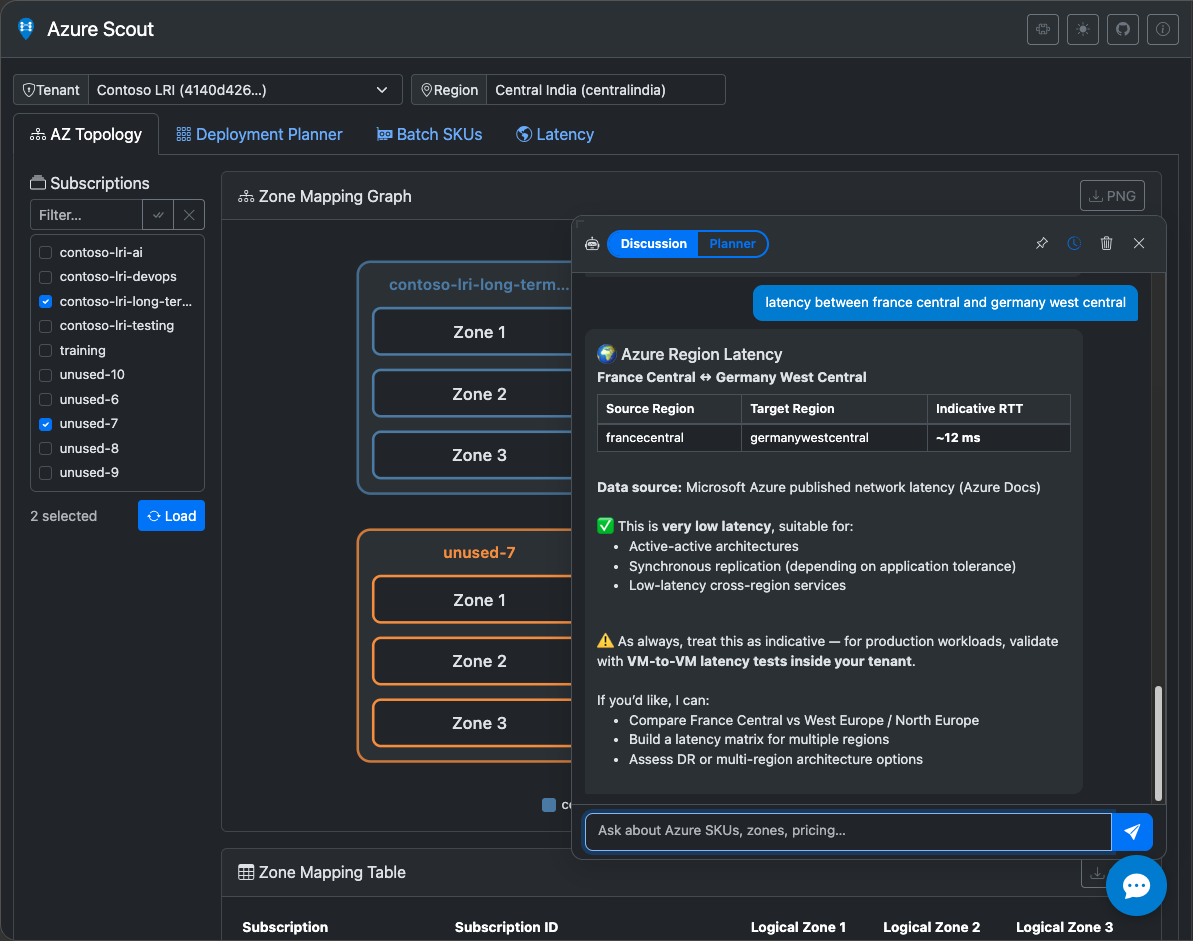
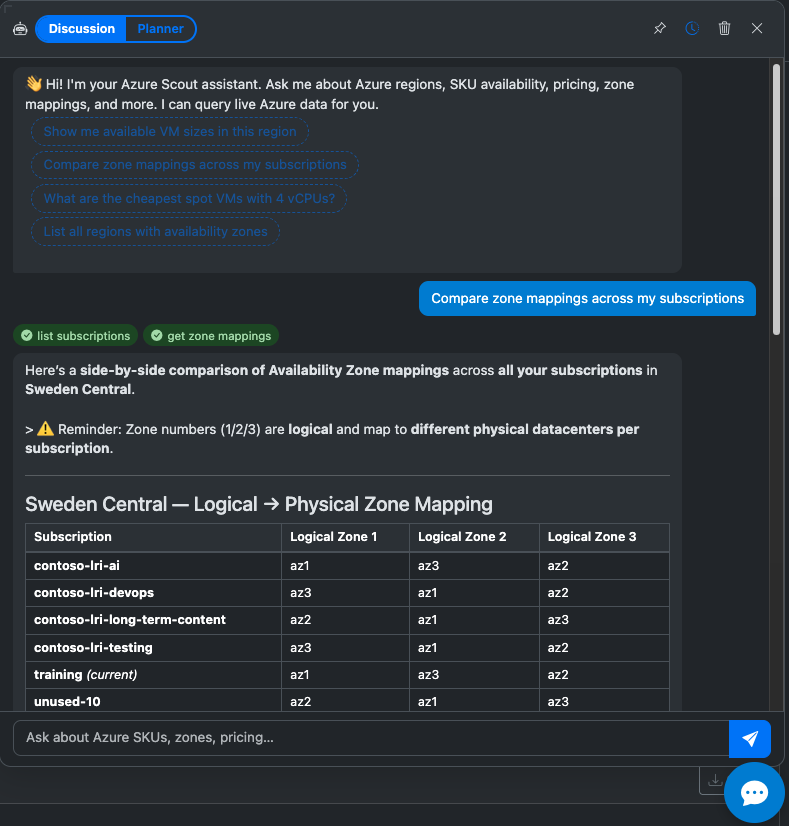
- AI Chat Assistant — an optional chat panel powered by Azure OpenAI with tool-calling support. It can query zones, SKUs, pricing, and spot scores on your behalf and present structured results.
- MCP Server — a Model Context Protocol server that exposes all capabilities as MCP tools, allowing AI agents (Claude Desktop, VS Code Copilot, etc.) to query your Azure infrastructure directly.
The tool is designed for local use — you run it on your workstation, and it talks directly to Azure APIs using your credentials.
Quick start
If you have Python ≥ 3.11 and valid Azure credentials:
1# If not already done:
2az login
3
4# No install required — just run it
5uvx az-scout
Your browser opens at http://127.0.0.1:5001 and you are ready to go.
For a permanent installation with uv:
1uv install az-scout
2az-scout
Or with Docker:
1docker run --rm -p 8000:8000 \
2  -e AZURE_TENANT_ID=<your-tenant> \
3  -e AZURE_CLIENT_ID=<your-client-id> \
4  -e AZURE_CLIENT_SECRET=<your-secret> \
5  ghcr.io/az-scout/az-scout:latest
Architecture overview
az-scout follows a clean separation of concerns that makes it both maintainable for the core and extensible for plugins:
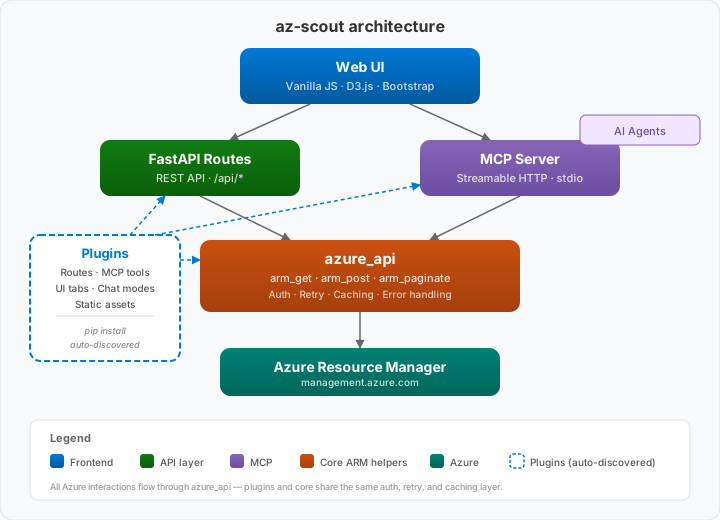
The azure_api module is the heart of the application. It provides helper functions to interact with Azure APIs: plugins can call these functions to get consistent authentication, retry logic, and error handling without worrying about the underlying API details.
The plugin system
One of the most interesting aspects of az-scout is its plugin architecture. The core application handles zone topology and deployment planning, but any additional capability is added through plugins — pip-installable Python packages that are auto-discovered at startup.
How plugins work
A plugin is a standard Python package that registers an az_scout.plugins entry point:
1[project.entry-points."az_scout.plugins"]
2my_plugin = "az_scout_myplugin:plugin"
At startup, az-scout discovers all installed plugins via importlib.metadata.entry_points and wires up their contributions automatically — no configuration needed.
Each plugin can contribute any combination of:
| Layer | What it provides |
|---|---|
| API routes | FastAPI APIRouter mounted at /plugins/{name}/ |
| MCP tools | Functions exposed on the MCP server for AI agents |
| UI tabs | Bootstrap tabs rendered in the main app |
| Static assets | CSS, JS, HTML fragments served alongside the plugin |
| Chat modes | Custom AI chat personalities with domain-specific prompts |
| Prompt guidance | Extra context injected into the default AI chat mode |
Creating a plugin
az-scout includes a built-in scaffold generator:
1az-scout create-plugin
This launches an interactive wizard that will asks for a plugin name, slug, package name, and GitHub repository details, then generates a complete project structure with routing, MCP tools, UI tab, tests, CI workflows, and proper packaging.
Existing plugins
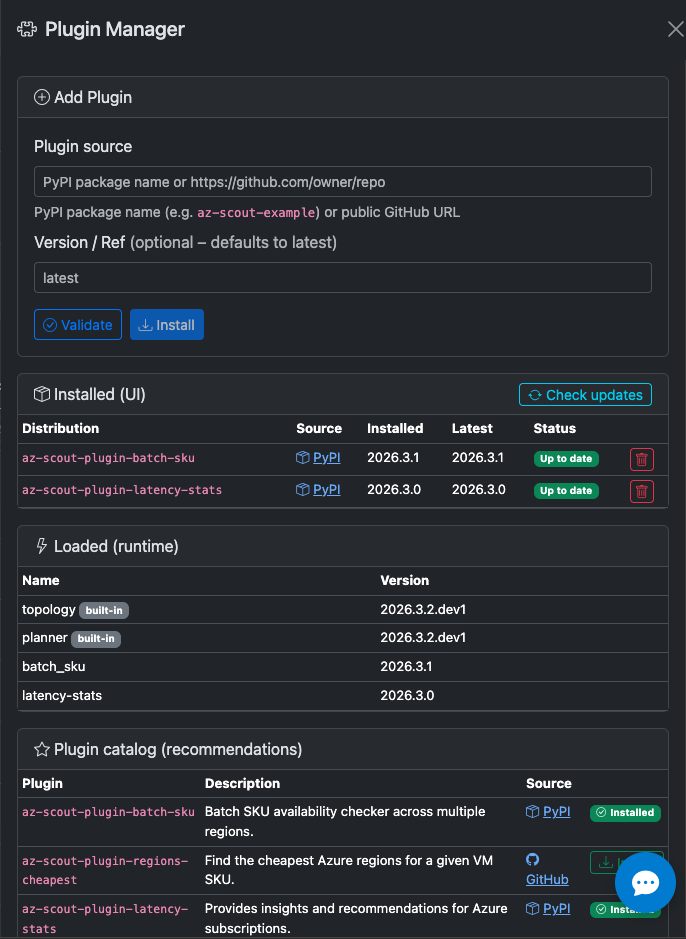
Several plugins already extend az-scout's capabilities and the installation is simplified by a Plugin Manager UI that lists installed and recommended plugins with one-click installation:
| Plugin | Description |
|---|---|
| az-scout-plugin-batch-sku | Azure Batch SKU availability — discover and compare Batch-supported VM SKUs per region |
| az-scout-plugin-latency-stats | Inter-region and Inter-zones latency statistics — World map with pairwise RTT between Azure regions |
| az-scout-plugin-avs-sku | Azure VMware Solution (AVS) SKU exploration with regional pricing and generation compatibility |
| az-scout-plugin-odcr-coverage | On-Demand Capacity Reservation (ODCR) coverage analysis — identify VMs at risk of allocation failure |
| az-scout-plugin-avs-rvtools-analyser | Azure VMware Solution (AVS) migration risk analysis from RVTools Excel exports. |
| az-scout-plugin-strategy-advisor | (WIP) Multi-region capacity strategy recommendation engine |
You can explore the plugin catalog from this page: docs.az-scout.com/catalog.
Future blog posts will dive into each plugin individually, covering their implementation details, Azure API integration patterns, and how they leverage the plugin architecture.
AI integration
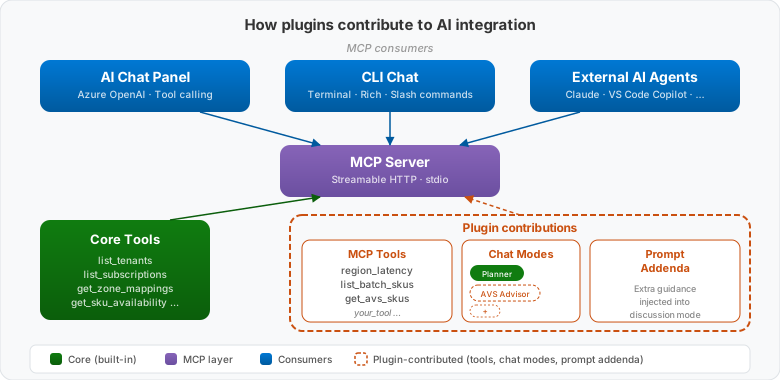
az-scout integrates with AI in three ways:
AI Chat Assistant
When configured with Azure OpenAI credentials (AZURE_OPENAI_ENDPOINT, AZURE_OPENAI_API_KEY, AZURE_OPENAI_DEPLOYMENT), a chat panel appears in the UI. The assistant can:
- Call MCP tools to help providing the best possible answer to user questions about zones, SKUs, pricing, spot scores…
- Clickable actions or prompt suggestions
- Switch between discussion mode (general Q&A), planner mode (guided deployment advisor).
Plugins can contribute their own chat modes with domain-specific system prompts: e.g., AVS SKU advisor.
CLI Chat
az-scout also includes an interactive AI chat that runs entirely in the terminal — no browser needed. It uses the same Azure OpenAI backend and MCP tools as the web UI chat.
1# Interactive session
2az-scout chat
3
4# One-shot query
5az-scout chat "What SKUs are available in francecentral with at least 8 vCPUs?"
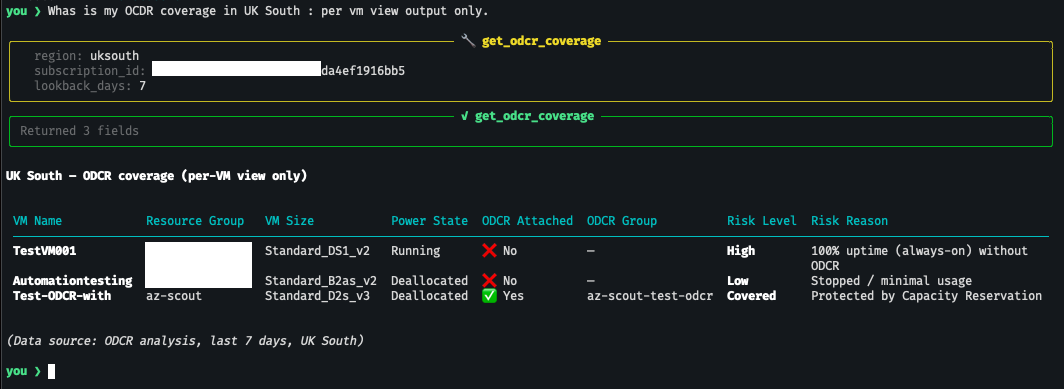
The CLI chat features Rich-rendered streaming (markdown, tables, code blocks), tool-call visualization, interactive numbered choices, conversation history with arrow-key navigation, and tab auto-completion for slash commands like /region, /mode, /subscription.
MCP Server
The built-in MCP server exposes all capabilities as tools that any MCP-compatible AI agent can call. This means you can use Claude Desktop, VS Code Copilot, or any other MCP client to query your Azure infrastructure through natural language — without the web UI.
The MCP server is available both via stdio (for local CLI integration) and Streamable HTTP (for hosted deployments):
1# stdio transport (local)
2az-scout mcp
3
4# Streamable HTTP (for Container Apps, etc.)
5az-scout mcp --http --port 8080
The default web running mode embeds a Streamable HTTP MCP server side to side with the web UI capabilities: enabling a combined use of the web interface and AI agents simultaneously.
Plugin in AI integration
Each plugin can contribute to the AI integration by providing:
- MCP tools — any plugin function can be exposed as an MCP tool with a simple decorator, making it callable from AI agents.
- Chat modes — plugins can define their own chat modes with custom system prompts, allowing them to provide specialized AI assistants for their domain.
- Prompt guidance — plugins can inject additional context into the default chat mode, enriching the assistant's knowledge with plugin-specific information.
What's next
az-scout is an evolving project. The plugin ecosystem is growing, and the core continues to gain new capabilities. Upcoming posts in this series will cover:
- AZ Topology — understanding logical-to-physical zone mappings and why they matter for multi-subscription architectures
- Deployment Planner — how the Confidence Score is computed and how to interpret its signals
- MCP integration — using
az-scoutas an AI agent backend for infrastructure planning - External plugins — deep dives into community-contributed plugins and how they leverage the architecture
Resources
- Documentation: docs.az-scout.com
- GitHub: github.com/az-scout/az-scout
- PyPI: pypi.org/project/az-scout
- Plugin Catalog: docs.az-scout.com/catalog
- Start your plugin adventure: it is as simple as
az-scout create-plugin
This tool is not affiliated with Microsoft. All capacity, pricing, and latency information are indicative and not a guarantee of deployment success. Spot placement scores are probabilistic. Quota values and pricing are dynamic and may change between planning and actual deployment.